
Your first unit
A unit is one device in the field. The collector on it reports which packages are installed, and Affectra matches them against vulnerabilities. This page is the short path to your first unit. Install the collector has every step in full, and this page does not repeat it.
You need a Linux unit that can reach the Affectra API, and a few minutes. For a unit that cannot, see Air-gapped units and bundles.
- Create a key. Under API keys in the app, create a key with the access Can propose changes, as in Your first release. Collectors need that access.
- Install the collector. Download the package for the unit’s architecture, verify it, and install it.
- Configure it. Put your organization, the key and the API address into
/etc/affectra/collector.env. Configure shows the three lines. - Tell Affectra which release the unit runs. Write the version to
/etc/affectra-release, using the version you gave the release in Your first release. Find affected units explains the file. - Start it. Enable the timer and run the collector once.
See the unit
Section titled “See the unit”Open Units in the app. The unit is listed once its report has arrived. If it is not there, check the log of the run. It names the error.
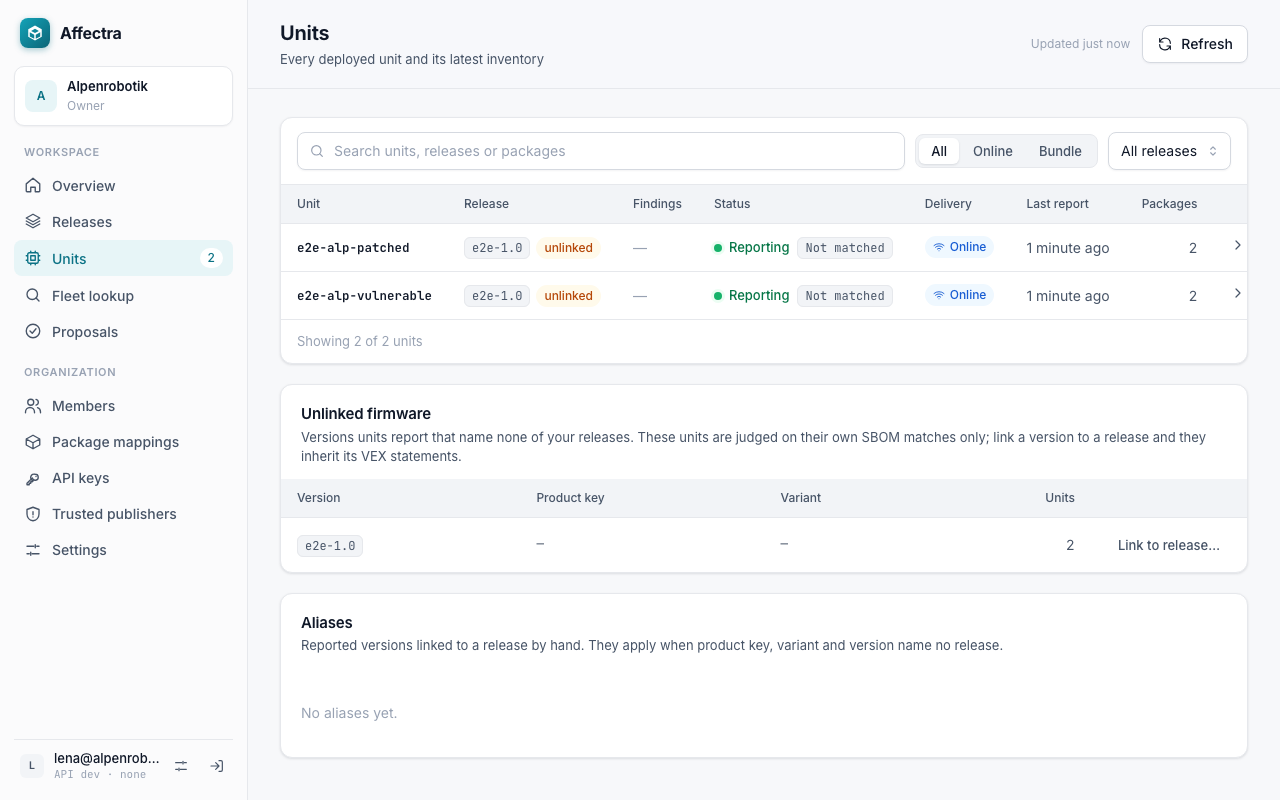
When the version the unit reports names one of your releases, the unit is linked to it. It then shows the findings of that release and the VEX statements you recorded. A version that names no release is listed under Unlinked firmware, where an admin can link it. Find affected units explains how.
- Look up which units a vulnerability reaches: Find affected units.
- Set up reports on every unit: the collector reference lists all settings.
- Back to the process: How Affectra fits your process.